
Money
Splitsy: split group costs and settle up
A trip, a shared flat, a dinner for eight. Splitsy keeps track of who paid for what and works out the shortest way to square up.
Open SplitsyWhat it does
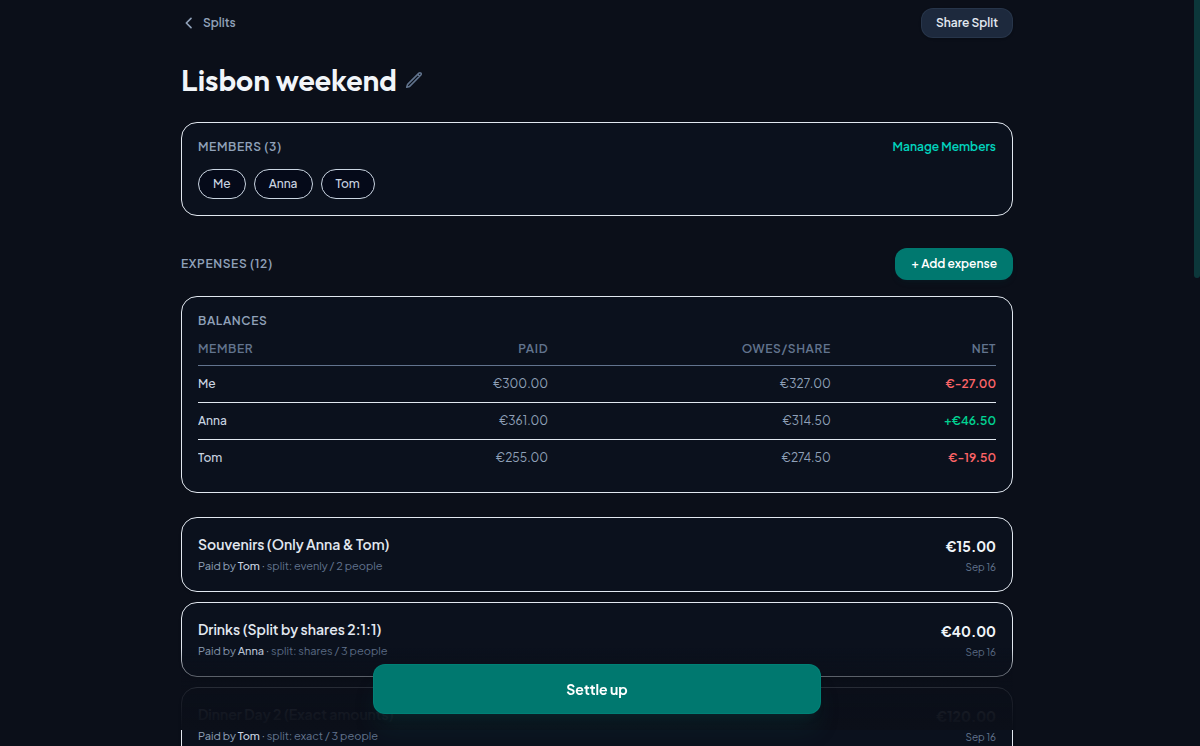
You add the people, then the expenses: who paid, how much, and how it divides. An expense can split evenly, by shares when one person had the bigger room, by exact amounts when the bill itemises, or among only some of the group when two people went to the museum and the third did not.
A balances table keeps the running answer: what each person paid, what they owe, and the difference. When the trip is over, Splitsy turns those balances into the smallest set of transfers that clears everyone, so three people settle in two payments instead of six.
How to use it
- Open Splitsy and create a split — give it the name of the trip or the flat.
- Add everyone taking part. No one needs an account, not even you.
- Add each expense as it happens: payer, amount, and how it divides.
- Check the balances table at any point to see where everyone stands.
- At the end, tap Settle up and pay the transfers it lists.
What makes it different
Sharing does not go through a server. The split is packed into the link itself, in the part of a web address that browsers never send anywhere, so whoever opens the link or scans the QR code gets the whole split out of the link text. Nothing is uploaded, and there is no account that could hold your trip.
There are also no daily limits on entries, no paid tier and no ads, and once opened the app can be installed and used without a connection.
Questions
- Do I need an account?
- No. Splitsy asks for no email, no password and no sign-up, and neither do the people you share a split with.
- Where is my data kept?
- In your own browser. It is not sent to a server, so clearing this site’s data in your browser erases the split for good — there is no copy anywhere else and no backup.
- How do others join a split?
- Send them the share link or let them scan the QR code. The split travels inside the link, so they see it immediately without installing or registering anything.
- Does it work offline?
- Yes. After the first visit it runs without a connection and can be installed to your home screen like an app, which is handy when you are abroad without data.